
Google AI Mode changes how search results are displayed and content is discovered.
Instead of 10 blue links, users now see AI-generated summaries, fewer clickable results, and a new interface designed for faster answers.
This guide explains what Google AI Mode is, how it works, and how to optimize your content for it.
What Is Google AI Mode?
Google AI Mode is a version of Google Search that replaces the standard results page with an AI-first layout. The interface includes AI-generated summaries and simplified link formats.
Think of it as a built-in research assistant powered by Google’s Gemini 2.5 model.
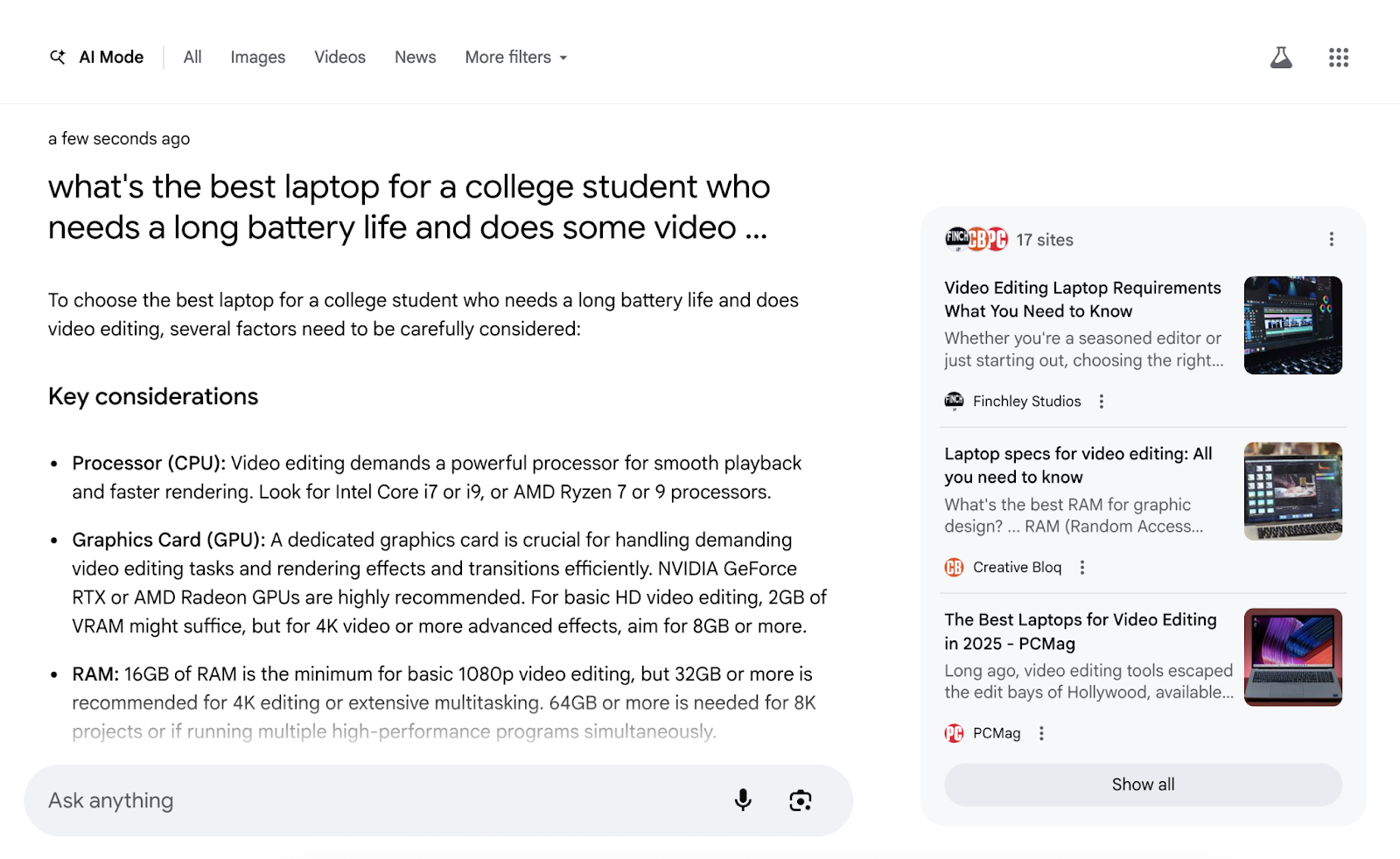
AI Mode appears as a separate tab in Google Search, alongside “Images” and “Videos,” or directly at google.com/aimode. Google also recently made AI Mode available on mobile devices when users click “Show More” within AI Overviews.
What Is the Difference Between AI Mode and AI Overviews?
AI Mode and AI Overviews both use generative AI, but they appear in different places and serve different purposes in Google Search.
AI Overviews appear in standard search results when Google determines they’re helpful. AI Mode is a separate experience accessible through the “AI Mode” tab, going to google.com/aimode, or clicking “Show More” from a mobile AI Overview.
Here’s a side-by-side comparison, as outlined by Google:
| Feature | AI Overviews | AI Mode |
| Access | Appears in regular Search results when helpful | Accessed via a separate Search tab or google.com/aimode |
| Purpose | Quick summaries for complex questions | Deeper, interactive exploration with follow-ups and comparisons |
| User interaction | Static response with supporting links | Conversational: allows follow-up questions and retains context |
| Best use cases | Understanding complex topics quickly | Exploratory tasks, product comparisons, how-tos, and planning |
| Input types | Text only | Multimodal: text, voice, and images |
| AI model | Custom Gemini model integrated with Search systems | Advanced Gemini model with agentic reinforcement learning for improved reasoning |
| Response depth | Summary of key info plus top supporting links | Synthesized response from multiple subqueries and diverse sources |
| Factuality protections | Relies on corroborated web results; avoids hallucinations | Adds reasoning safeguards and dynamic factual verification from Google sources |
| Visual experience | Mostly text with limited formatting | Rich visuals, evolving UI, and action-based linking (e.g., booking, how-tos) |
| Trigger frequency | Selective: only appears when Google is highly confident | Broader: appears for more complex queries but still uses quality thresholds |
How Is Google AI Mode Different from Other AI Tools?
Google AI Mode is built to work within Google’s ranking ecosystem. That makes it more relevant to SEO than standalone AI tools like ChatGPT or Perplexity.
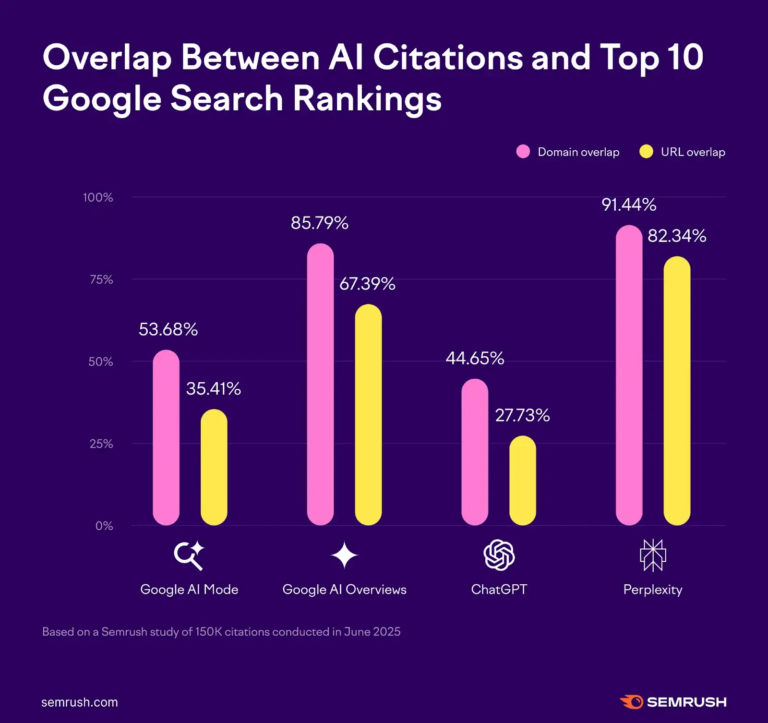
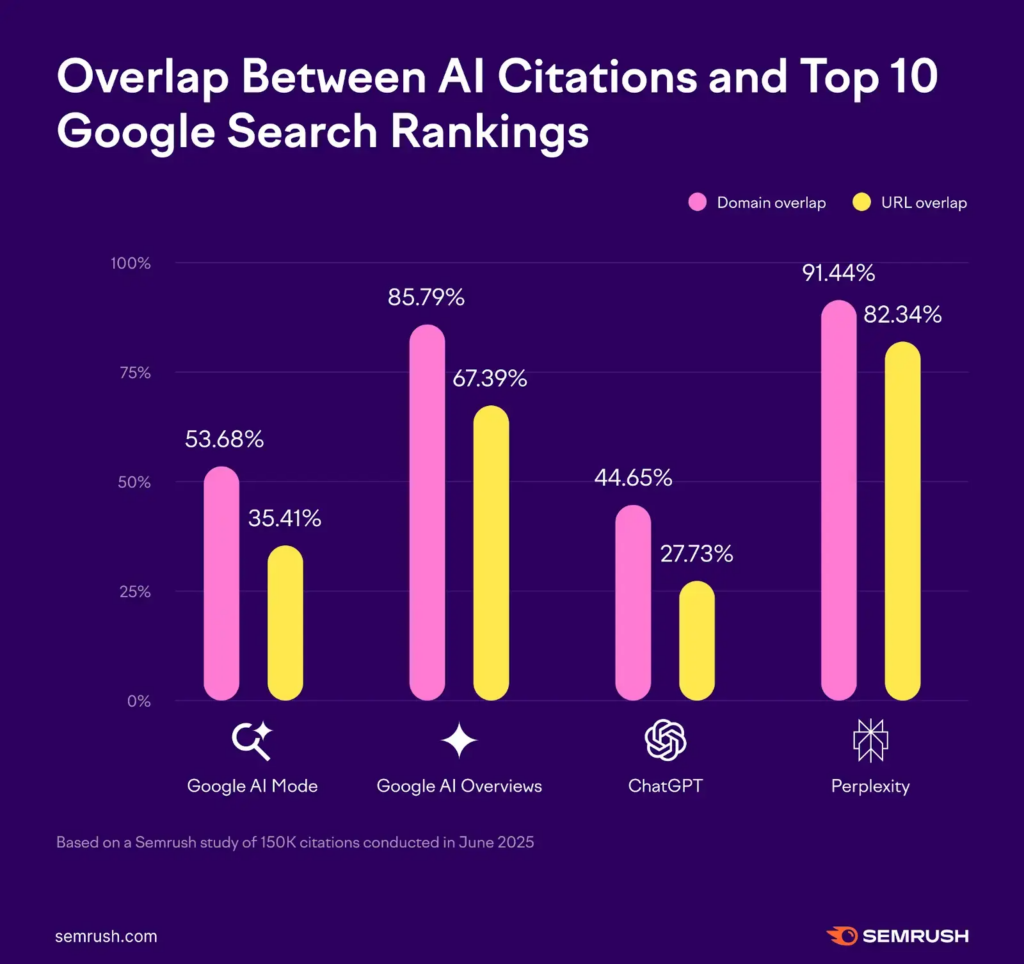
Semrush ran a study comparing AI Mode to traditional Search, AI Overviews, ChatGPT, and Perplexity
Here’s how Google AI Mode stands out:
| Feature | Google AI Mode | Other AI Tools (e.g., ChatGPT, Perplexity) |
| Link diversity | Shows ~7 unique domains in sidebars; only 51% overlap with Google’s top 10 organic results | Typically link to fewer, more common sources |
| Organic URL alignment | 89% of link domains match Google’s top domains; 80% of exact URLs match | Lower overlap with traditional organic search results |
| Use of UGC (e.g., Reddit) | Frequently cites Reddit and community content | Reddit also appears, but usage varies |
| Response length for commercial queries | Twice as long for product or commercial searches vs. informational ones | Also show longer, richer responses for commercial queries (similar behavior) |
| Source breadth | Pulls from a wider range of domains beyond Google’s core rankings | ChatGPT relies partly on fixed training data; Perplexity uses recent content plus citations |
| Visual UI & sidebar design | Unique sidebar format showcasing external sources and domain diversity | Perplexity uses footnotes; ChatGPT (free) has limited source transparency |
| Context handling | Maintains context across follow-up questions but feels more informational than conversational | ChatGPT and Perplexity handle multi-turn conversations well |
And unlike ChatGPT, Google’s AI Mode shows ads for some queries. According to Search Engine Land, Google began briefing brands ahead of Q4 2025 on how they can use AI Mode to reach their audiences.
SEO consultant Brodie Clark also noticed ads within AI Mode:
“Ads within AI Mode are here. This marks a significant difference between Google’s AI Mode and the likes of ChatGPT, with ChatGPT not having even close to the same infrastructure for ads as Google does.”
And compared to other AI tools, AI Mode is trained to reflect Google’s ranking signals, which makes it an important focus for your SEO strategy.
What Gets Cited in Google AI Mode vs. Traditional Search?
Google AI Mode doesn’t mirror the top 10 organic search results. It selects sources based on perceived trust, relevance, and formatting—not just rankings.
To see how citations differ, Semrush analyzed sidebar sources in AI Mode vs. the top 10 traditional search results for five high-intent SEO queries:
- “best SEO tools”
- “how to create an SEO strategy”
- “what is technical SEO”
- “SEO audit checklist”
- “local SEO”
Here’s what we found:
| Query | % Domain Overlap (AI Mode vs Organic Top 10) | Notable Differences |
| Best SEO tools | ~50% | AI Mode cited Retainr, AgencyAnalytics, and Reddit, none of which appeared in the top 10 organic |
| SEO strategy | ~40% | AI Mode showed Shopify and HubSpot, while traditional search emphasized Backlinko and Google Docs |
| Technical SEO | ~60% | AI Mode prioritized Search Atlas and Landingi—missing from the organic top 10 |
| SEO audit checklist | ~30% | AI Mode highlighted WordStream and SEO PowerSuite, neither of which were in the top organic results |
| Local SEO | ~45% | Sidebar showed Squarespace, Broadly, and Search Engine Journal, diverging from results like Wikipedia and local business listings |
Across all five queries, the average domain overlap between AI Mode and traditional organic results was under 50%. Exact URL overlap was often below 30%.
Ranking well doesn’t guarantee inclusion in AI Mode. Your content is more likely to appear if:
- Your domain shows up across the web, including forums, directories, citations
- Your content is structured for AI readability (modular, concise, and expert-backed)
- Your brand is cited by trusted third parties, even if those mentions aren’t linked
How Does Google AI Mode Affect SEO?
Google AI Mode represents the biggest change to search in years. Traffic is down. Google Search Console can’t track it. Visibility now depends on citations, not just rankings.
Here’s what SEO professionals need to know:
Less Traffic, Even if You Rank
AI-generated answers are taking clicks from traditional search results. Ranking in the top 10 no longer guarantees visibility.
According to Pew Research, AI-enhanced SERPs have cut click-through rates by nearly 49%. AI Overviews started this trend. AI Mode accelerates it.
Semrush data shows that 92% of AI Mode responses include a sidebar with about seven unique domains. But:
- Only 53% of those domains match the top 10 organic search results
- Only 35% of the URLs match
Sergei Rogulin, Head of SEO at Semrush, says now is a good time to “Stop worrying so much about lost traffic.”
“Instead, shift your focus,” he says. “This is a new landscape, and visibility now means something different.”
Ask:
- How is your brand represented in AI answers?
- Do those answers reflect your values?
- How can you shape them?
Focus there.
A Shift from Ranking to Reputation
In AI Mode, visibility comes from citations, not first-page rankings. Google’s AI selects trusted sources, even if they don’t rank in the top 10.
AI Mode summarizes responses and links to curated sources. Only about half of those match traditional results. The rest are chosen based on:
- Authority and trust (.edu, .gov, news sites)
- Community credibility (Reddit, Quora, forums)
- Topical expertise (industry blogs, niche publishers)
If your brand isn’t present where people are asking and answering questions, or your content isn’t seen as credible, you’re less likely to be cited.
Analytics Are Falling Behind
Google Search Console doesn’t yet show traffic from AI Mode or AI Overviews. That makes it hard to measure what’s working.
Traditional metrics—clicks, impressions, and rankings—don’t tell the full story anymore. SEOs must now track:
- How often your brand is cited in AI-generated answers
- Where your mentions appear (even unlinked)
- Your share of voice in AI summaries
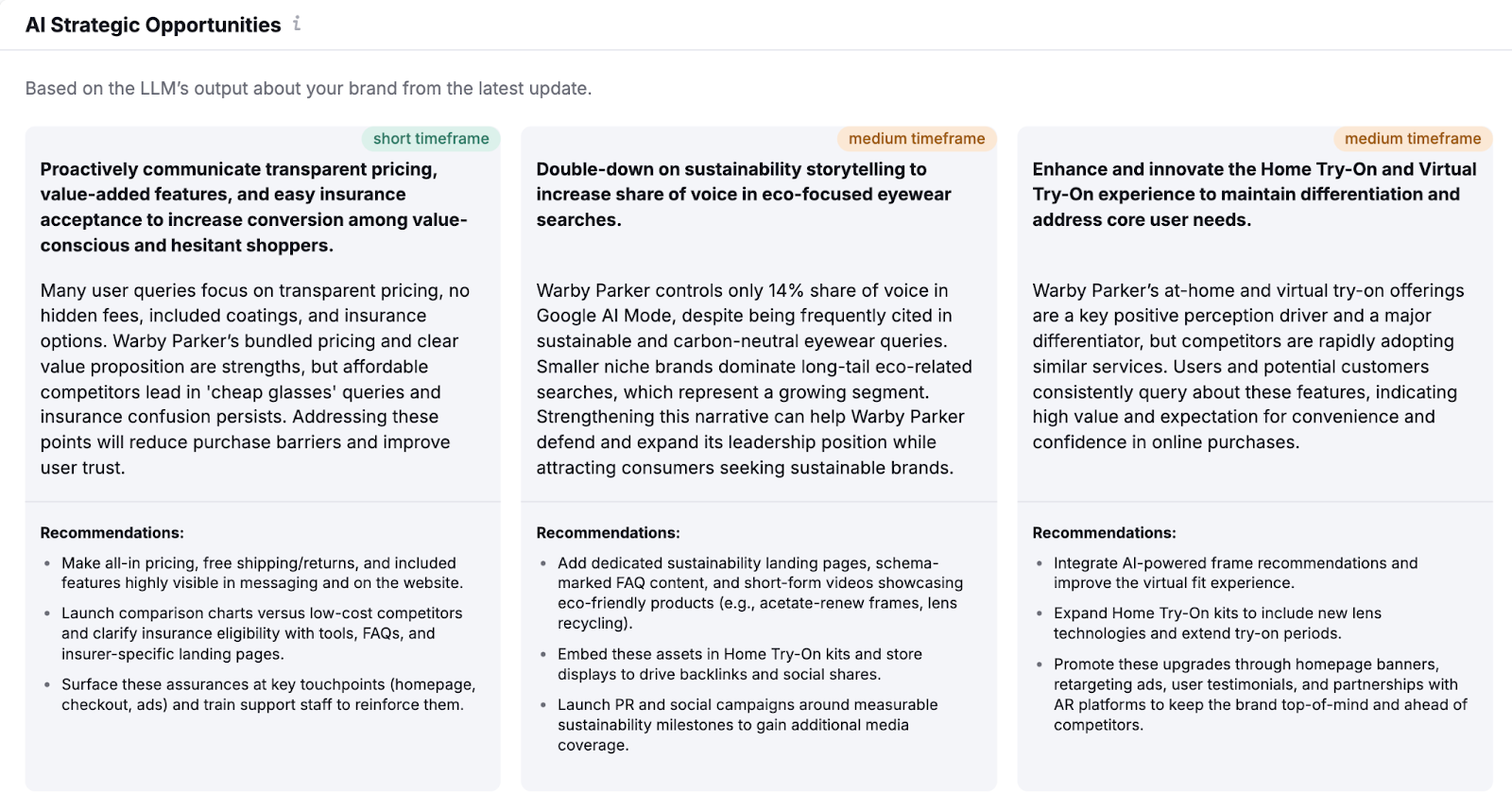
Semrush’s AI Visibility Toolkit can help. Enter your domain to see how your brand is represented in AI search:
Track Google AI Mode Citations
with the Semrush AI Visibility Toolkit

How to Optimize for Google AI Mode (Step-by-Step Guide)
Want your content featured in Google’s AI results? Follow these steps:
1. Start with Fundamental SEO Best Practices
Google’s AI favors content that’s well-structured, trustworthy, and easy to crawl. Core SEO practices still apply, and they matter more now than ever.
Focus on these fundamentals:
- Format for readability. Use no-fluff answers, bullet points, and short paragraphs in a conversational tone. Make content easy to scan.
- Demonstrate E-E-A-T. Showcase experience, expertise, authoritativeness, and trustworthiness. Use real authors, expert insights, and source citations. These factors describe content Google wants to rank.
- Get technical SEO right. Prioritize fast load times, mobile responsiveness, clean heading hierarchy, and crawlable HTML. Help search engines parse your content efficiently.
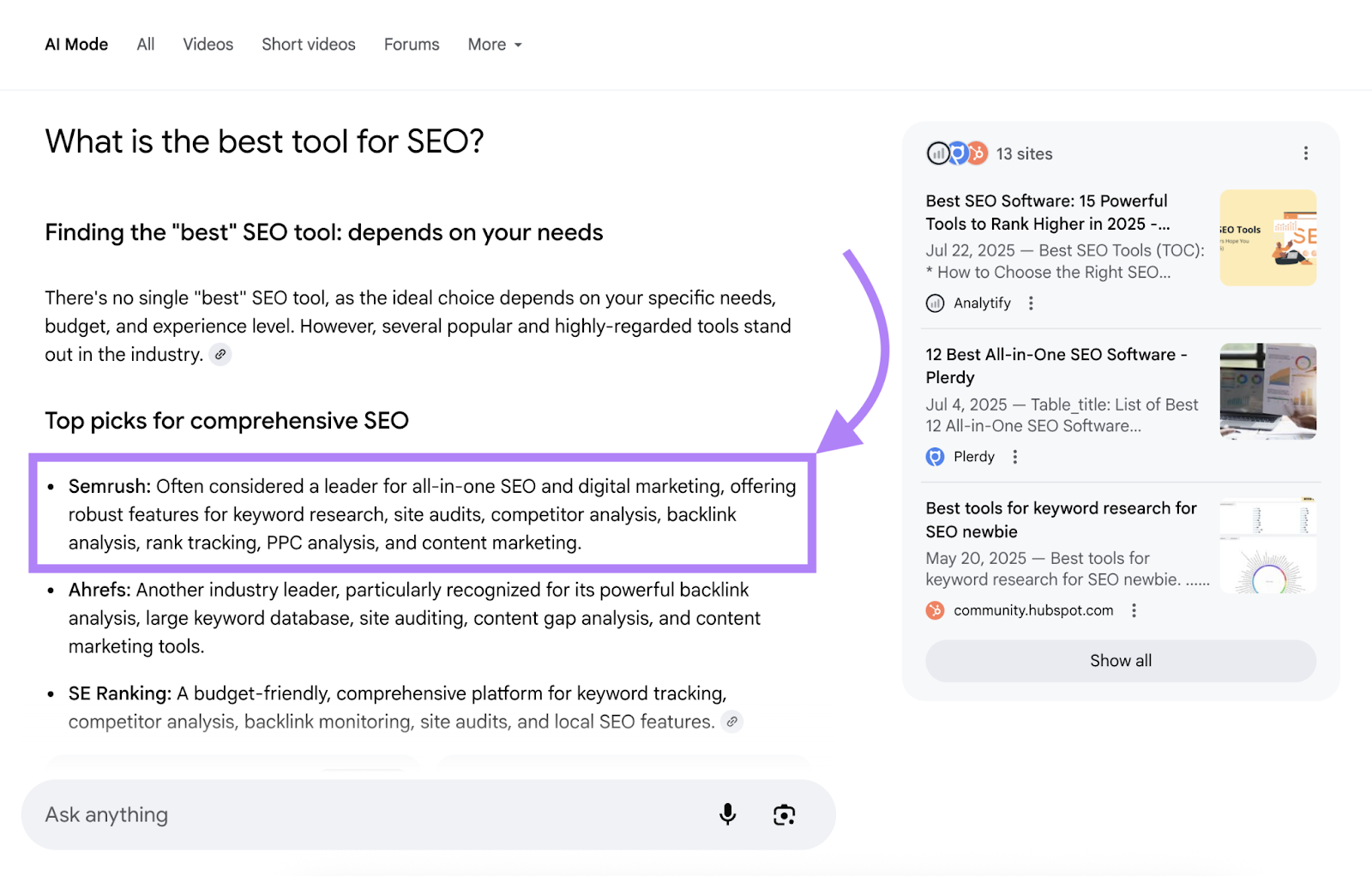
For example, Semrush often appears in AI Mode results for queries like “what is the best tool for SEO”